The Platform Built for PHED 1164
eFit was built in a kinesiology classroom by an instructor who teaches Introduction to Physical Fitness and Wellness. It runs the whole course: weekly activity graded straight from students' phones and trackers, pre and post fitness assessments, an eBook with eight modules and 12 interactive 3D labs, and a grade file ready for your LMS.
Faculty accounts are free. Student access is $59 per semester and includes the eBook.
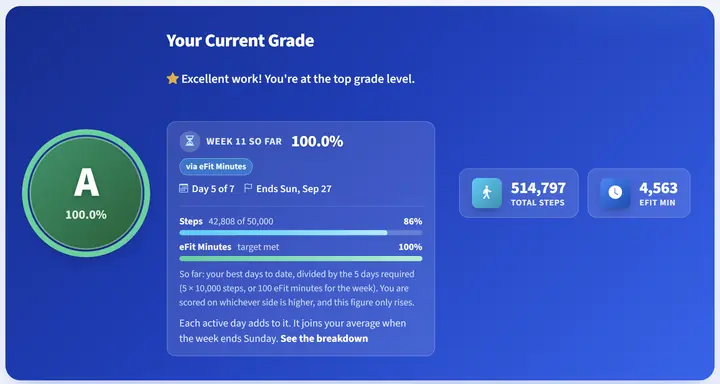
The student view of a PHED 1164 activity grade: best five days, scored on steps or minutes, whichever is higher.
Every Line of the PHED 1164 Catalog Description, Covered
The ACGM description asks students to participate, assess their fitness, and learn five content areas. Here is where each one lives in eFit.
“Students will participate in physical activities”
Phones and trackers report steps and active minutes through Google Health or Apple Health. eFit scores every week automatically.
“and assess their fitness status”
Pre and post fitness assessments with the 1-mile walk, push-ups, and plank by default, VO2max calculated, and percent change shown for each test.
“proper nutrition”
Module 4, the Build a Plate lab, nutrition data from Google Health, and AI Paper Review coaching on the PHED 1164 nutrition paper.
“weight management”
Module 5 and the Energy Balance Machine lab, where students adjust food, steps, and exercise and watch energy flow in and out.
“cardiovascular health”
Module 2, a beating 3D heart at every intensity, the Heart Rate Zone Lab, and a student's own eight weeks of steps in 3D.
“flexibility”
Module 6 with the Range of Motion and Text Neck labs.
“and strength training”
Module 3, the eFit Gym lab with 10 equipment stations, and AI-built training plans with progression rules.
The same coverage maps to the five ACGM learning outcomes, from describing the components of fitness through planning, implementing, and evaluating a personal fitness program. The online PHED 1164 syllabus template shows the outcome map, a 16-week schedule, and policies you can copy.
How a PHED 1164 Section Runs on eFit
Set it up once. eFit handles the logging, the math, and the reminders all term.
Quick Setup builds the section
Enter your term dates. eFit creates the activity tracker assignment, the fitness assessment, and the written paper, calculates every due date, and fits a class Walking Journey trail to the length of your term.
Students connect in week one
Students link Google Health or Apple Health from a phone or tracker. The connection is read-only, and from then on activity syncs on its own.
eFit grades and nudges
Weekly activity scores calculate automatically. Students see their grade climb during the week, and eFit emails anyone with no recorded activity for four days or an assessment window coming up.
You export and roll forward
Download a CSV formatted for D2L, Canvas, or Blackboard when grades are due. Next term, duplicate the course and every date shifts to the new calendar.
What Students and Instructors See
Screens from eFit's own test account. No student data.
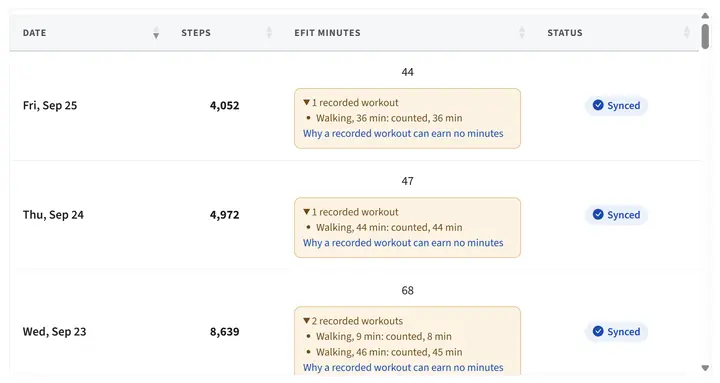
Daily activity record
Every day has a dated row of steps, eFit minutes, and recorded workouts, so a grade question has an answer on file.
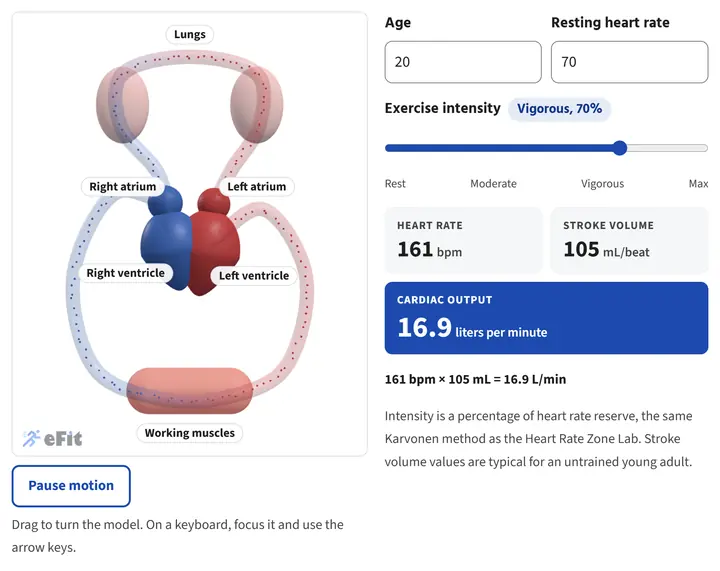
Module 2: Your Heart at Every Intensity
Students raise exercise intensity and watch heart rate, stroke volume, and cardiac output change on a beating 3D heart.
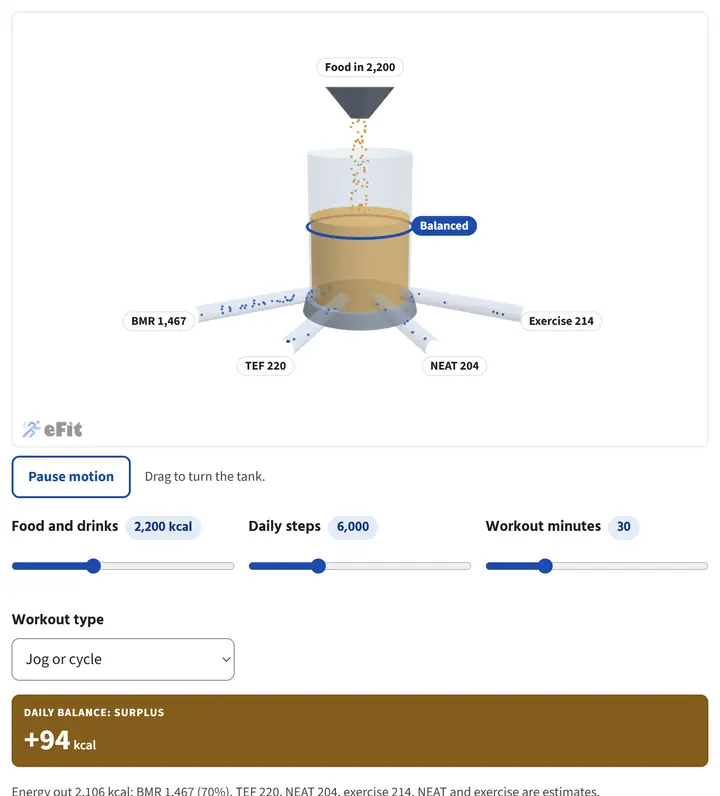
Module 5: The Energy Balance Machine
Students adjust food, steps, and exercise and see how energy balance drives weight management.
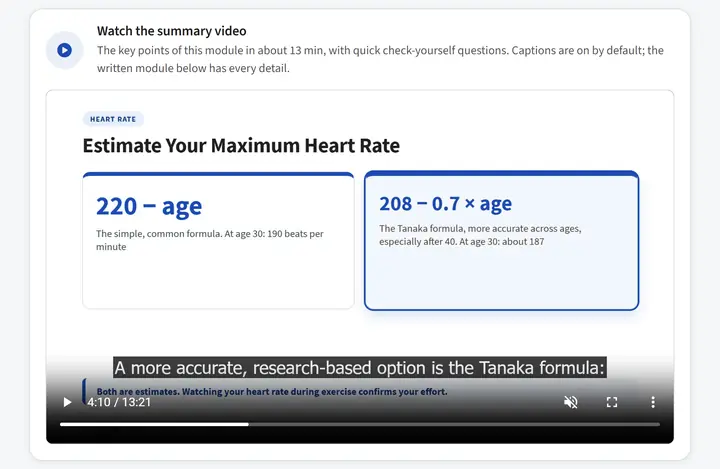
A narrated video for every module
Ten to fourteen minutes of animated slides, captions on by default, and check-yourself questions.
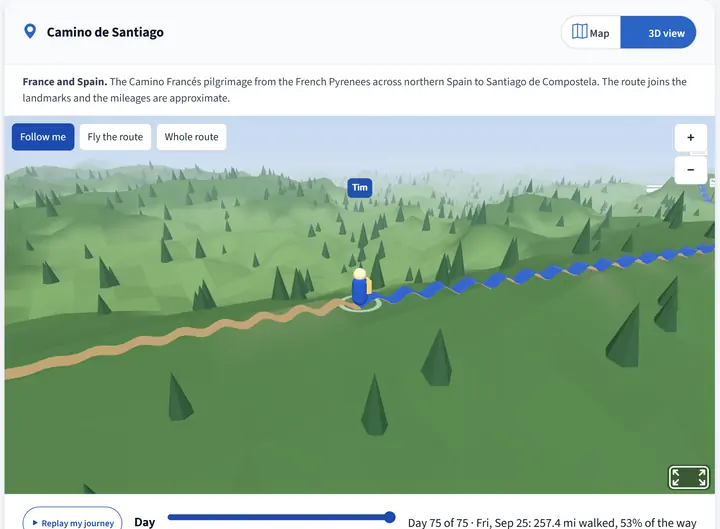
A class Walking Journey
The class walks a famous trail together in a map or 3D view, sized to your step goal and term length.
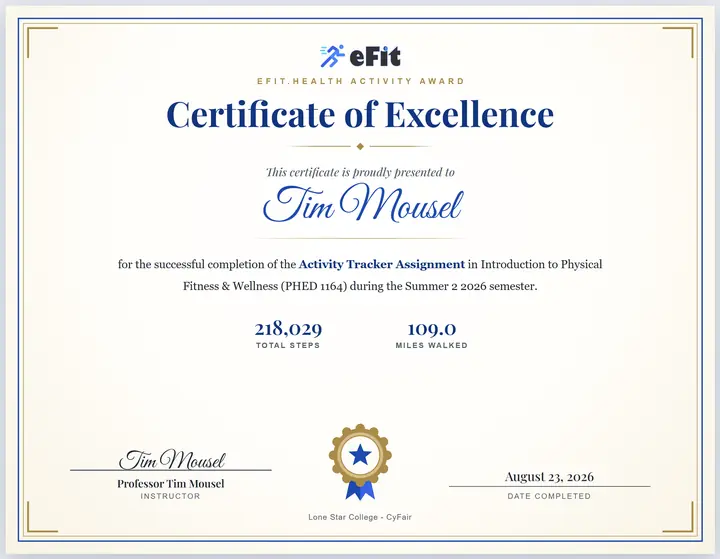
A certificate to work toward
Students who finish the activity tracker at 70 percent or higher earn a printable certificate.
Fitness Assessments That Grade Themselves
Students enter their pre-test and post-test results during the windows you set. eFit calculates VO2max from the Rockport 1-mile walk and shows each student the percent change on every test. The default battery is the 1-mile walk, push-ups, and the plank, and you can add the 1.5-mile run, Astrand or YMCA step test, crunches, sit-and-reach, or body fat percentage.
Our pre and post fitness testing protocol covers timing and growth scoring in detail.
Coaching on the Nutrition Paper
The PHED 1164 nutrition paper asks students to compare a three-day food log with their own DRI targets. eFit's AI Paper Review reads a student's draft section by section against the assignment rubric and coaches them on what to strengthen before they submit. It leaves the writing and the grading in human hands, and students get three reviews per term.
Students who track food in Google Health can also open their macronutrient charts inside eFit for the paper.
Running in Texas Kinesiology Departments
17,665 students have tracked their activity with eFit since 2018.
Recent Texas institutions
Lone Star College, University of Houston-Downtown, and College of the Mainland ran eFit courses with enrolled students in the past 12 months.
Online, hybrid, and face to face
Fully online sections use device data as the lab component. Face-to-face and hybrid sections add in-person assessments and keep the same automatic weekly grading.
“The eFit Software program has been a valuable tool for my activity component classes. The registration process, technical support, and the ability to have automated activity grading has been awesome.”
Lois Heeren, Physical Education Instructor
KINE 1164, dual credit, and related courses
KINE 1164 is the same course under another prefix, and eFit runs it the same way. Dual credit sections taught on high school campuses work too, since eFit serves students 13 and older. Departments that also teach KINE 1338 Concepts of Physical Fitness, walking and jogging activity courses, or out-of-state wellness courses such as North Carolina's PED 110 can see how eFit fits each one on the fitness and wellness courses page.
Questions About eFit for PHED 1164
To list eFit with your course materials at the campus bookstore, or to purchase seats in bulk on one invoice, email sales@efit.software. Bulk pricing is quoted per institution. All three purchase channels are on the pricing page.
Open a PHED 1164 Section in the Demo
The demo opens a fully populated course with activity grades, fitness assessments, the eBook modules, and the 3D labs. No sign-up and no credit card.
Try the Free DemoPlanning a section? Read the online PHED 1164 syllabus template, see how automated fitness tracking works in PHED 1164, or review our data security practices.