
Stop grading step screenshots.
Students connect the phone they already carry. eFit collects their steps and active minutes and scores every week automatically, so your weekend goes back to teaching.
Faculty accounts are free. Student access is $59 per student, per semester.
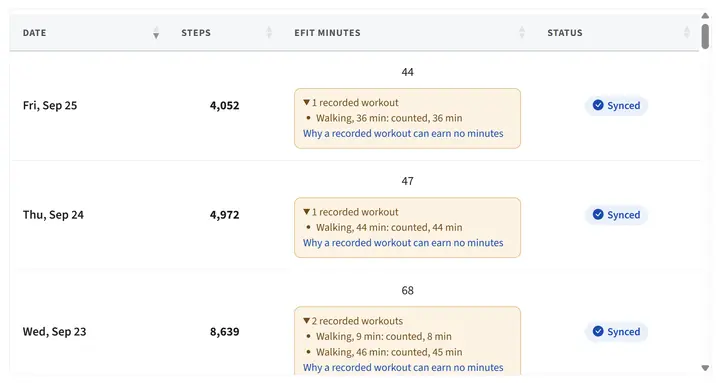
A student's activity log. Every day arrives dated and synced, with no screenshot in sight.
The weekly grading job you can hand off
Online activity courses ask students to exercise on their own and prove it. That usually means a stack of app screenshots, paper logs with dates you cannot check, and a long Sunday adding up minutes. eFit replaces the stack with data that arrives on its own.
Students connect once
In the first week, each student links Google Health on Android or Apple Health on iPhone. A phone counts steps by itself, and any tracker that syncs to Google Health adds active minutes.
Every week scores itself
By default eFit counts each student's best 5 of 7 days and awards the higher of two scores: average daily steps (10,000 earns full credit) or weekly active minutes (100 earns full credit). You can change every row of the scale.
You see who needs a nudge
The at-risk report lists students who never connected a device and students whose activity has gone quiet. Reminder emails go out on their own, and you spend your time on the few who need a personal note.
A dated record for every day of the term
Steps and active minutes arrive from Google Health and Apple Health dated as they happened. When a student asks about a grade, you open the week in question and see each day.
- Day-by-day history for every student, all term
- Students see exactly how many steps or minutes stand between them and the next grade
- The grading scale is set once and applied the same way to everyone
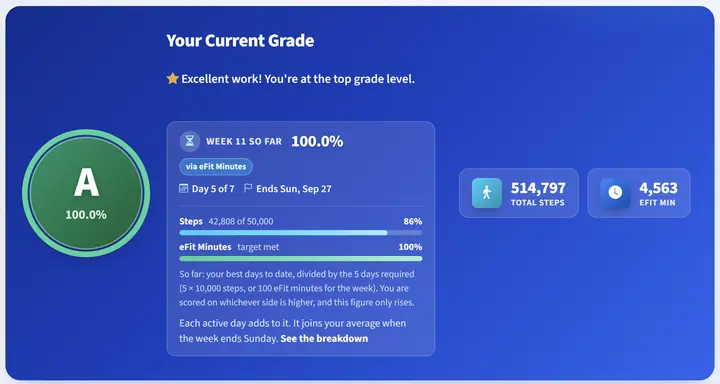
The student view of a weekly activity grade.
The rest of the course comes with it
eFit is the course text and the activity lab in one place, built by a kinesiology instructor who teaches PHED 1164.
- 8 eBook modules, each with a narrated summary video
- 12 interactive 3D labs, from a beating heart to an energy balance machine
- Pre and post fitness assessments: the 1-mile walk with VO2max, push-ups, and plank, scored against age and gender norms
- The Walking Journey, where the whole class walks a famous trail on a map
- PocketAI Journal reflections and a completion certificate
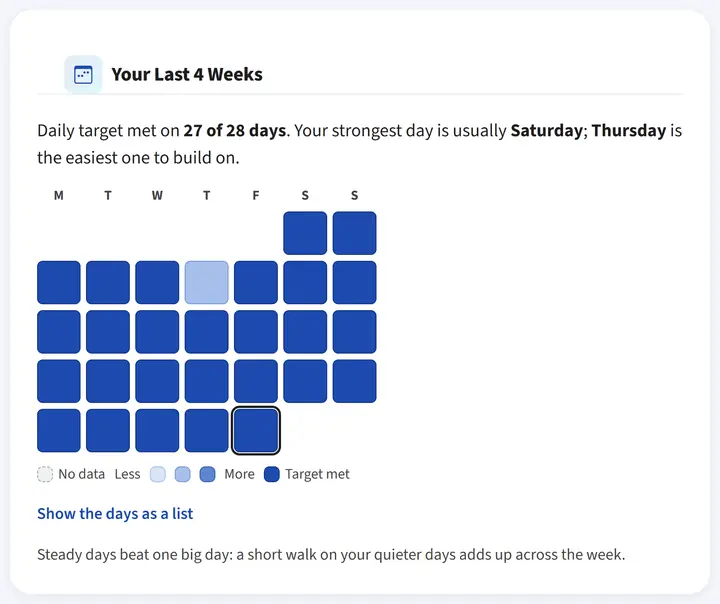
Students get feedback that keeps them moving between grades.
What faculty say
"The eFit Software has been a tremendous addition to my activity classes. The registration process, technical support, and automated activity grading have been awesome and top notch."
"eFit allowed my physiology students to put what they're learning into practice and see their own physiology at work. The service getting my course set up was top notch."
What it costs
Faculty
Free
Your faculty account, the course template, and every report. No license fee for the department or the college.
Students
$59
$59 per student, per semester. Includes the eBook, the 3D labs, the Walking Journey, and activity tracking.
Three ways to pay
- Students buy access directly
- The campus bookstore sells an access code, so financial aid can cover it
- The department buys seats in bulk on one invoice or purchase order
Questions faculty ask
Do students need to buy a fitness tracker?
No. A smartphone counts steps on its own and reports through Google Health or Apple Health. Any tracker that syncs to Google Health also works, including Fitbit, Apple Watch, Garmin, and Samsung, and adds active minutes as a second way to earn credit.
What happens when a student never connects?
They appear on the at-risk report, and the platform sends reminder emails on its own. You decide when to step in with a personal note.
Can I change the grading scale?
Yes. The default counts the best 5 of 7 days and the higher of steps or active minutes. You can change every row of the scale, the number of required days, and individual targets.
How long does setup take?
Quick Setup builds the activity tracker, the fitness assessment, and the course paper with due dates calculated from your term dates. Most instructors finish in one sitting, and we will walk you through it on a call if you like.
Is student data private?
eFit is FERPA compliant. Students grant read-only access to their activity data through Google Health or Apple Health, and all traffic is encrypted with 256-bit SSL.
What does it cost?
Faculty accounts are free, with no license fee for the department. Student access is $59 per student, per semester, bought directly, through the campus bookstore, or in bulk by the department.
See a scored week in two minutes
Open the demo, click into a sample class, and look at the activity grades eFit produced for it.
The demo runs in your browser with sample classes. No sign-up.