
Every online section. One grading scale.
Ten sections and ten instructors can still grade activity the same way. eFit gives each section the same course template, scores activity from students' phones, and keeps pre and post fitness results for program review.
No license fee for the department. Student access is $59 per student, per semester.
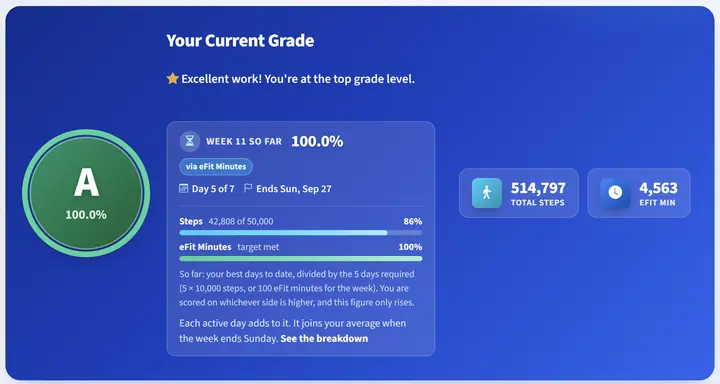
The same scoring rule in every section, whoever teaches it.
What changes for the department
Consistent grading
One shared course template sets the activity scale, the assessment schedule, and the due dates. Full-time and adjunct sections run the same course, and a student who changes sections meets the same rules.
Defensible grades
Activity arrives from Google Health and Apple Health dated as it happened. When a grade is questioned, the instructor can show each day of the week in question.
Program review evidence
Every student has a beginning-of-term and end-of-term fitness result with the change shown per test, and section-level results roll up for your self-study.
Fast onboarding
Quick Setup builds a section's activity tracker, fitness assessment, and course paper with dates calculated from the term. A new adjunct can be ready in one sitting.
Students who need help surface early
The at-risk report lists students who never connected a device or whose activity has gone quiet, and reminder emails go out automatically.
No device budget
Students use the phone they already carry. Any tracker that syncs to Google Health or Apple Health works too, and nobody has to buy one.
A Fall 2027 adoption, step by step
Most departments start with one or two online sections and add the rest the following term. Check your own bookstore and adoption deadlines; these are typical windows.
- Now through JanuaryOpen the demo, then set up a free faculty account for yourself or one lead online instructor.
- FebruaryWe map eFit's modules, labs, and assessments to your course outcomes in a 15-minute call.
- March to AprilChoose how students pay (directly, a bookstore access code, or department-funded seats) and submit the adoption before your campus deadline.
- AugustSections are built from the shared template. We support instructors during the first week.
- DecemberPre and post fitness results are ready for the department's review.
Pilot one section first
Faculty accounts are free, so a pilot costs the department nothing. Students in the pilot pay $59 per semester, the same as later sections.
A complete course, built by a kinesiology instructor
eFit was built by a kinesiology instructor who teaches PHED 1164, and its eight eBook modules cover the topics in the course description: fitness and wellness concepts, cardiovascular fitness, strength and endurance, nutrition, weight management, and flexibility.
- 8 modules with narrated summary videos
- 12 interactive 3D labs
- Pre and post assessments scored against age and gender norms
- The Walking Journey and PocketAI Journal reflections
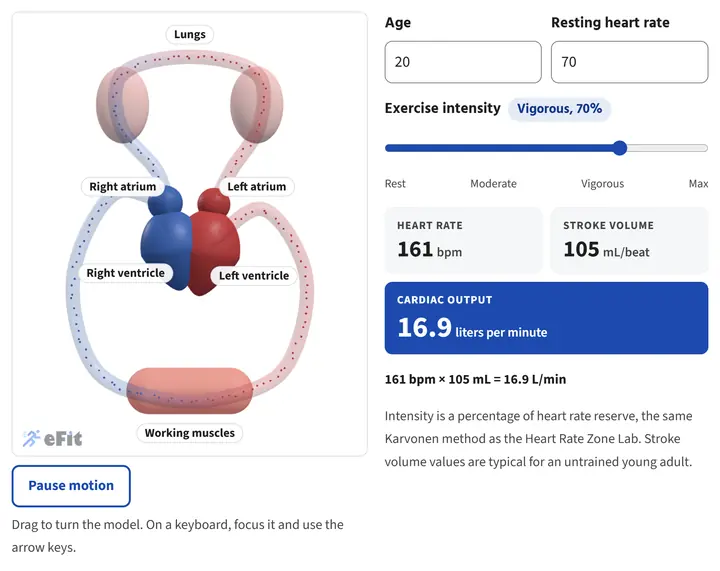
One of the 12 interactive 3D labs.
What it costs the department, and what students pay
Faculty
Free
Your faculty account, the course template, and every report. No license fee for the department or the college.
Students
$59
$59 per student, per semester. Includes the eBook, the 3D labs, the Walking Journey, and activity tracking.
Three ways to pay
- Students buy access directly
- The campus bookstore sells an access code, so financial aid can cover it
- The department buys seats in bulk on one invoice or purchase order
What faculty say
"The eFit Software has been a tremendous addition to my activity classes. The registration process, technical support, and automated activity grading have been awesome and top notch."
"eFit allowed my physiology students to put what they're learning into practice and see their own physiology at work. The service getting my course set up was top notch."
Questions faculty ask
Can every section use the same setup?
Yes. One shared course template carries the activity scale, the assessment schedule, and the module sequence, so every section starts from the same configuration.
How do we show improvement for program review?
Each student completes a pre and post fitness assessment: the 1-mile walk with VO2max, push-ups, and plank by default. eFit scores each against age and gender norms and shows the change per test. Section-level results roll up, and you can download them for your self-study.
What if our college runs First Day, IncludED, or another course-materials program?
Contact us before your adoption deadline. We will work with your bookstore on how eFit is listed so students are charged once, through the program your college already uses.
What about students who cannot pay?
The department can buy seats in bulk on one invoice or purchase order, which also suits dual credit sections where students cannot be charged for materials.
Is it accessible?
eFit is built to ADA standards. The 3D labs work with a keyboard, include a pause control for motion, and carry a full text description for screen reader users.
Who supports our instructors?
We set up faculty accounts, walk instructors through Quick Setup, and answer questions during the first week of the term.
Start with one section
Download the chair's guide for the full picture, or open the demo and look at a sample class right now.
The demo runs in your browser with sample classes. No sign-up.